




Transform your inbox into a productivity powerhouse. Outlook CRM integration eliminates window-switching, automates repetitive tasks, and puts your entire customer database at your fingertips—right where you work.
back to homeTime Saved on Admin Tasks
Saved Per Rep Annually
ROI in First Year
Increase in CRM Adoption
Sales professionals waste up to 40% of their day on administrative tasks that have nothing to do with selling. The culprit? Constantly jumping between their email inbox and CRM system.
Copying contact information from email signatures and manually entering it into separate CRM fields—tedious and error-prone.
Searching for the right opportunity or account to log an email thread against, wasting valuable minutes.
Opening multiple browser tabs to update deal stages, close dates, or other CRM fields.
Manually tracking every call, email, and meeting in your CRM timeline instead of focusing on conversations.
Rewriting the same introductory or follow-up emails over and over without templates or automation.
Losing context when an old client reaches out unexpectedly, forcing you to scramble for information.
These micro-inefficiencies compound into hours of wasted time every week. Time that could be spent building relationships, closing deals, and driving revenue. Salesboom's Outlook CRM integration eliminates this productivity drain by bringing your CRM directly into your inbox—the place where you already spend most of your workday.
Integrating a CRM into your Outlook inbox doesn't just change where you work; it fundamentally changes how much you can accomplish.
Your CRM sidebar appears directly in Outlook, displaying relevant customer information, interaction history, and open opportunities as you read emails. No searching, no guessing, no delays.
Server-side synchronization ensures every email, meeting, and calendar event is automatically logged to the appropriate CRM records. Your activity history builds itself in the background.
Update deal stages, create contacts, set reminders, launch email sequences, and manage your pipeline without ever leaving your inbox. Everything you need is accessible in one place.
The result? Sales teams report significant time savings, improved data accuracy, and faster response times—all while maintaining the familiar Outlook interface they already know and trust.
Discover powerful CRM editions to scale your business efficiently.
A complete CRM suite with Marketing Automation, ERP integration, and Support tools — built for performance and value.
Explore ProfessionalFor large enterprises — automate workflows, unify data, and leverage analytics to drive strategic growth.
View EnterprisePerfect for small teams starting with CRM — manage leads, track sales, and boost productivity with simplicity.
Discover TeamHere are the top 10 ways Outlook-integrated CRM eliminates busywork and accelerates your sales process:
The system automatically detects a new sender and allows you to "Add to CRM" in one click. The CRM intelligently parses their email signature to fill in name, company, title, phone number, and other details automatically.
Impact: 100+ hours saved annually with 10 contacts per day
Use a "Set Regarding" button directly in the Outlook header to instantly link the entire email conversation to a specific Opportunity, Project, or Case record. The linking is bidirectional for seamless navigation.
Impact: 40+ hours saved annually with 50 emails per day
Update deal stages, change close dates, edit budget fields, or modify any CRM data without leaving the message you're reading. Make critical updates the moment you receive information.
Impact: 80+ hours saved annually with 20 updates per day
Access pre-built email templates for common scenarios with dynamic merge fields that auto-populate customer-specific information. Personalize at scale without manual typing.
Impact: 60+ hours saved annually with 5 templates per day
Enroll contacts into pre-set nurture campaigns directly from Outlook. The system automatically sends personalized follow-ups at optimal intervals, pausing when prospects engage.
Impact: Nurture 10x more leads without increasing workload
Server-Side Sync technology automatically logs every email you send and receive in the CRM timeline. No BCC email addresses, no manual clicks—it just works.
Impact: 60+ hours saved annually on activity logging
Get instant notifications when prospects open emails, click links, or download attachments. Strike while interest is hot with perfectly timed follow-ups.
Impact: 25-40% improvement in response effectiveness
Insert your availability directly into emails with one click. Prospects book meetings instantly without back-and-forth scheduling emails.
Impact: Eliminates 3-4 scheduling emails per meeting
See your complete sales pipeline, filter by stage or value, and drag-drop deals to new stages without opening separate CRM tabs. Your pipeline is always visible.
Impact: 40-60% improvement in forecast accuracy
Select multiple emails and perform batch actions like adding to a campaign, setting regarding links, or marking as logged. Process your inbox in minutes, not hours.
Impact: 60+ hours saved annually on email processing
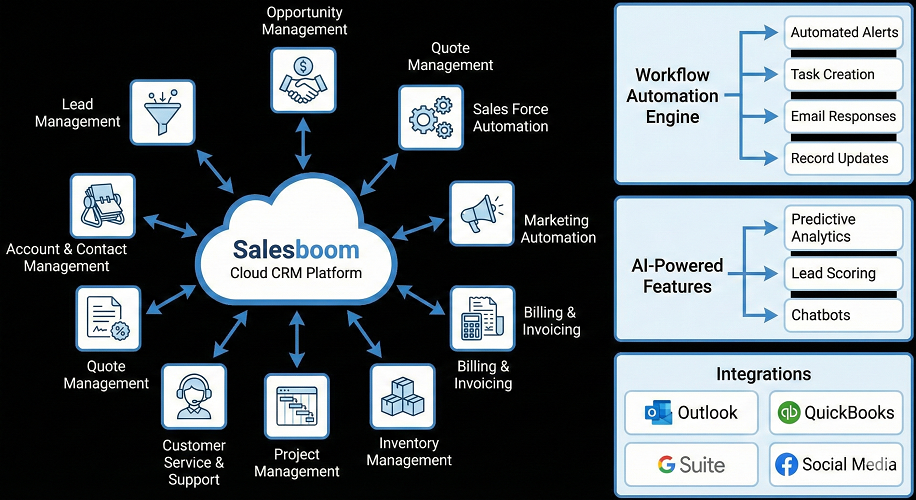
Access CRM features directly inside Outlook, synchronizing your emails, contacts, and activities seamlessly. Learn more about Outlook 365 CRM App
Set up automated email replies to keep your customers engaged efficiently. Discover Auto Response Email Features
Enhance your email productivity with specialized tools integrated into your CRM. Explore CRM Email Tools
Let's quantify the actual business impact of Outlook CRM integration with a real-world example:
Assumptions: 10-person sales team, $75,000 average salary ($36/hour)
Time Savings: Each person saves 40% of 2 hours daily admin time = 0.8 hours/day
Annual Time Savings
Per 10-person team
Annual Cost Savings
In labor efficiency
Revenue Impact: 10% increase in sales productivity from redirected time
If team generates $2M annually: 10% increase = $200,000 additional revenue
Total Annual Impact (Savings + Revenue)
CRM Integration Cost: $15-50/user/month = $1,800-6,000/year for 10 users
Return on investment in first year alone
Reduction in Data Entry Errors
Faster Response Times
Higher Conversion Rates
While any sales organization can benefit, certain industries and roles see particularly dramatic improvements.
Organizations handling hundreds of leads simultaneously benefit from bulk processing, automated logging, and instant context retrieval. Manage 2-3x more opportunities without dropping balls.
Consultants, lawyers, and accountants who bill by the hour need perfect time tracking. Automatic activity logging captures every client interaction for accurate billing.
Remote and field sales teams need CRM access on the go. Outlook mobile integration ensures complete customer context during client meetings without laptop access.
Large companies benefit from standardized templates, shared workflows, and consistent data capture across hundreds of users ensuring corporate compliance.
Tech companies with long sales cycles use engagement tracking and automated sequences to nurture prospects efficiently. Real-time alerts help teams strike when interest peaks.
Experience the power of Outlook CRM integration firsthand. Book a personalized demo to see how our seamless integration eliminates busywork and supercharges your sales productivity.
Connect Microsoft Outlook 365 with your CRM to sync emails, contacts, and activities automatically. Learn more about Outlook 365 CRM integration
Enable seamless email communication with cloud-based CRM solutions for better tracking and visibility. Explore cloud CRM email integration
Centralize, organize, and manage all customer emails directly inside your CRM. See how email management works in CRM
Automate Gmail emails, follow-ups, and tracking directly within your CRM. See Gmail CRM automation in action
Get clear answers, tips, and best practices for Outlook CRM integration. Read Outlook 365 CRM integration FAQs
Read how Construction-Outlook365-CRM improves planning and collaboration on projects.
Explore how Healthcare-Outlook365-CRM optimizes clinical and administrative workflows.
See how Government-Outlook365-CRM enhances public sector service delivery.
Learn how Communication-Outlook365-CRM enhances connectivity and messaging.
See how Insurance-Outlook365-CRM strengthens CRM workflows for insurance.
Discover benefits of Outlook365-CRM-Integration-For-Sales-Team tailored for sales teams.