


Eliminate spreadsheets and manual processes with automated expense tracking that saves time, reduces errors, and gives you complete visibility into operating costs.
Error Reduction
Hours Saved Monthly
Years of Innovation
Trusted Organizations
Most businesses are drowning in expense-related administrative work. Employees submit expenses through email attachments, handwritten receipts, and scattered spreadsheets. Finance teams spend countless hours chasing missing documentation, reconciling discrepancies, and manually entering data into accounting systems.
These inefficiencies don't just waste time—they drain profitability, create employee dissatisfaction, and expose your organization to financial and compliance risks. The solution is a centralized, automated expense tracking system that eliminates manual processes and gives you real-time financial control.
Salesboom's Expense Reports tab transforms expense management from a chaotic, manual process into a streamlined, automated workflow. Built directly into your CRM platform, it creates a single system of record for all employee and operational expenses—eliminating the need for separate expense tracking tools or disjointed spreadsheets.
Employees can submit expense reports in minutes, not hours. The intuitive interface guides them through a standardized submission process that ensures complete, accurate documentation every time.
Managers gain complete visibility into team expenses with powerful approval tools that make decision-making fast and informed. No more digging through email threads or chasing down missing information.
Finance teams get structured, auditable expense data that integrates seamlessly with accounting systems. The days of manually entering data from paper receipts are over.
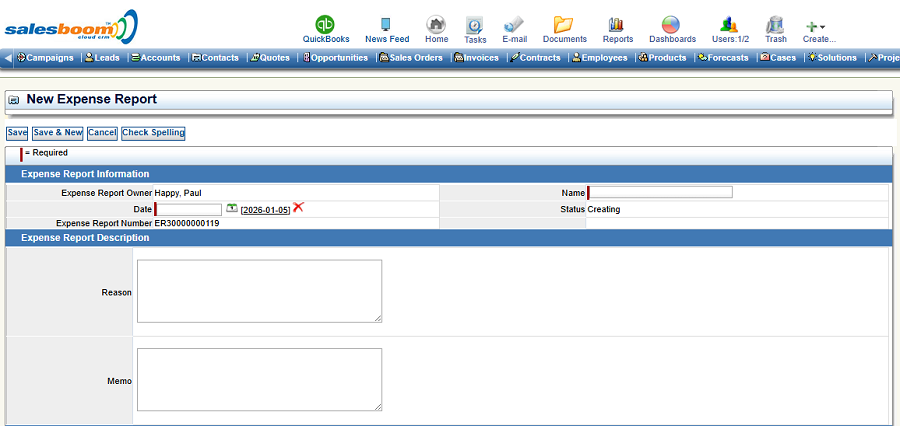
Salesboom's streamlined expense submission process eliminates confusion and ensures complete, accurate reports every time. Here's how it works:
Click the "Add Expense Report" button from the Expense Reports tab. The system automatically assigns a unique tracking number and sets the report owner to the logged-in employee, eliminating manual data entry errors.
Fill in essential fields including the report date, a descriptive name (such as "January Travel - Eastern Region" or "Q4 Client Entertainment"), and set the initial status to "Creating" while you finalize details.
The Expense Report Description section asks for two critical pieces of information: the business reason (travel, client meeting, training, equipment purchase, etc.) and any optional memo notes for managers or finance.
Save your expense report and update the status to "Submitted" when ready for review. The system automatically notifies the appropriate approvers, and you can track progress in real-time through the status lifecycle.
As your organization grows and expense volume increases, finding specific reports quickly becomes critical. Salesboom's powerful search and filtering capabilities ensure you can locate any expense report instantly.
Whether you're a manager reviewing team expenses, a finance professional preparing reports, or an employee checking reimbursement status, the search system puts the information you need at your fingertips in seconds.
Expense data is only valuable when it flows into your accounting system without manual re-entry. Salesboom's QuickBooks integration and export capabilities ensure your expense data moves seamlessly into your financial records.
Native integration with QuickBooks Online and QuickBooks Desktop automatically syncs approved expense reports to your accounting system. Expense categories, vendor information, and payment details transfer seamlessly without manual data entry.
Export expense data to Excel, CSV, or PDF formats for custom reporting, board presentations, or integration with other financial systems. Schedule automated exports to run daily, weekly, or monthly without manual intervention.
Set up approval routing rules that automatically assign expense reports to the right managers based on amount, department, or expense type. Automated email notifications keep everyone informed without manual follow-up.
Transform your expense management process from a time-consuming burden into a strategic financial control tool.
Finance teams save 10-15 hours per month on data entry. Managers save 3-5 hours on approvals. Employees save 30-45 minutes per expense report on submission.
Eliminate duplicate submissions, missing documentation, and data entry errors through automated validation and standardized processes.
Monitor spending patterns, identify budget overruns, and make informed decisions with up-to-the-minute expense data rather than waiting for month-end reports.
Complete documentation, approval trails, and consistent categorization ensure you're always prepared for internal audits or external compliance reviews.
Submit expenses immediately after they occur using mobile devices, capture receipt photos, and track reimbursement status from anywhere.
Identify spending patterns, enforce policy compliance, and optimize operating costs through comprehensive analytics and reporting.
The expense tracking system includes powerful analytics and reporting capabilities that transform raw expense data into actionable business intelligence.
Organizations typically achieve full return on investment within 4-6 months through time savings, error reduction, and improved financial control.
Many businesses use standalone expense management tools that create yet another disconnected system to maintain. Salesboom's integrated approach delivers advantages that separate us from the competition.
Expense tracking lives inside your CRM alongside customer data, sales activities, and project information—enabling powerful cross-functional analysis and eliminating data silos.
Expense tracking is included in your CRM subscription at no extra charge—unlike standalone tools that add $5-$15 per user per month to your software spend.
Employees use the same login credentials for expenses as they use for CRM—no separate usernames, passwords, or systems to remember.
Combine expense data with sales, project, and customer information in unified reports and dashboards—revealing insights impossible to see with disconnected systems.
Link expenses directly to specific projects, customers, or opportunities for accurate job costing and profitability analysis—critical for service businesses.
Built by a company with over two decades of experience delivering business management solutions to 3,500+ organizations across 159 countries.
Salesboom's expense tracking system is designed for rapid deployment with minimal disruption to your business operations. Our proven implementation methodology ensures you're tracking expenses accurately and efficiently within days of launch.
Our implementation team works with you to configure expense categories, approval workflows, status options, and integration settings to match your existing processes.
If you're transitioning from another system, we import your historical expense data to ensure continuity and enable trend analysis.
We provide role-based training for employees, managers, and finance teams through live sessions, recorded videos, and comprehensive documentation.
Launch the system with confidence knowing our support team is available 24/7 to answer questions, troubleshoot issues, and ensure smooth adoption.
See how Salesboom's automated expense tracking system can save your team 10+ hours per month while improving accuracy and financial control. Schedule a personalized demo to see the platform in action with your own data.
Discover powerful CRM editions to scale your business efficiently.
A complete CRM suite with Marketing Automation, ERP integration, and Support tools — built for performance and value.
Explore ProfessionalFor large enterprises — automate workflows, unify data, and leverage analytics to drive strategic growth.
View EnterprisePerfect for small teams starting with CRM — manage leads, track sales, and boost productivity with simplicity.
Discover TeamMonitor and control business spend with advanced expense tracking features within CRM.
Connect ERP financial data with operational insights via ERP expense tracking integration .
Boost your business returns with smart strategies in Revenue Growth Tools .
Schedule and track support team availability using Support Hours Management .
Get a clear view of your total cost picture via Total Cost Analysis Tools .
Track and analyze return trends with Return & Refund Metrics .
Empower customers to solve issues independently via Self-Service Support Portal .
Connect business functions and accelerate growth with Revenue Lifecycle Management Guide .
Align teams and processes for higher performance with Revenue Operations Guide .