
Without the ability to filter and customize how CRM data is displayed, teams waste time, miss critical records, and operate with far less efficiency than they should.
When every record is dumped into a single unfiltered list, the data your team needs most is buried under thousands of irrelevant entries — slowing every lookup and frustrating every user.
Without saved views, every team member re-enters the same filter criteria repeatedly — multiple times per day, every day. That accumulated time is a significant hidden productivity drain across the organization.
Default views display every field for every record regardless of relevance. Sales reps see service fields, support agents see finance columns — clutter that slows reading and increases the chance of missing key information.
A single default view can never serve every role equally. Sales, service, and operations teams all have different data priorities — yet without custom views, everyone is stuck with the same generic display.
Weekly pipeline reviews, overdue follow-up checks, and regional account audits take twice as long when teams cannot quickly surface the specific dataset they need through a pre-configured, reusable view.
Over time, CRM dropdowns fill up with outdated, redundant, or abandoned views that nobody uses. Without the ability to delete and manage them, navigation becomes slower and more confusing for new and existing users alike.
From the View drop-down box located toward the top of most item data tab pages, you can generate a summary of the items relevant to that tab. This is the fastest way to slice through large datasets without building anything from scratch.
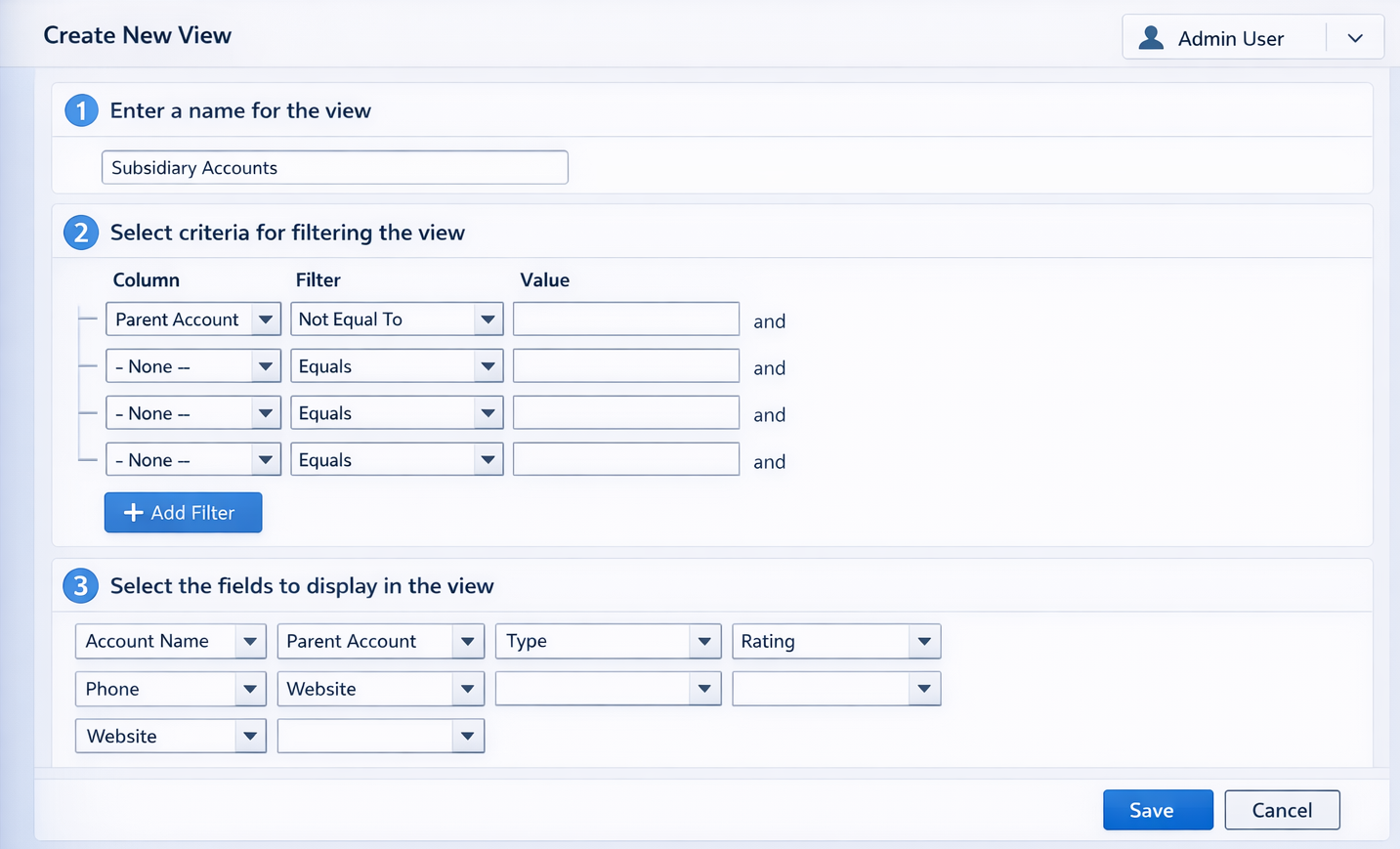
Custom Views give you full control over what data you see and how it is filtered. Define your own combination of filter criteria and display columns — then save and reuse them at any time.
Enter a descriptive name in the Step 1 text field. Choose a name that clearly identifies the filter or audience it represents — for example, "Open Contacts – New York" or "Accounts Created This Month" — so it is easy to recognize in the View dropdown later.
Choose a Column Name from the dropdown, select a filter operator (such as equals or less than), and enter a value. Repeat to stack multiple filters. The available columns change depending on which data type — Contact, Account, or other — the view is being created for.
Select the specific fields to appear as columns when this view is active. Removing unnecessary columns keeps your team focused on the information that matters most. Click Save when done — the new Custom View appears in the dropdown immediately.
Business workflows change. Salesboom Custom Views are fully editable and permanently removable — keeping your dropdown clean, relevant, and useful for the entire team.
Custom Views are one of the most powerful productivity features in your CRM tab pages. Used strategically, they eliminate repetitive filtering and give every team member instant access to exactly the data they need.
Name your views so they are self-explanatory in the dropdown list. A name like "Open Contacts – New York" is far more useful than "My View 3" — especially when multiple team members share the same dropdown list.
Create views for the tasks your team performs repeatedly — weekly pipeline reviews, overdue follow-up queues, regional account lists, or monthly new contact summaries. Save once, use forever.
Fewer columns mean faster scanning. In Step 3, select only the fields that are relevant to the specific workflow this view supports. Remove everything else — your team will find the data they need twice as fast.
Build different views for sales, service, and operations teams so each person sees only what is relevant to their daily work. Role-specific views reduce cognitive load and keep team members focused on their priorities.
Step 2 supports multiple filter conditions in a single view. Combine criteria — for example, a status filter with a date range — to create highly targeted, specific views that would be impossible to replicate quickly with manual filtering.
Schedule a monthly review of your Custom Views. Delete outdated, redundant, or no-longer-used views to keep the dropdown uncluttered and easy to navigate — particularly as your team and workflows grow over time.
Custom Views work across all CRM data types and benefit every team that relies on tab page data for daily operations.
Sales reps need instant access to their active pipeline, leads by region, and accounts due for follow-up. Custom Views built around sales workflows eliminate the noise of records that do not relate to active deals or prospects.
Support agents need to see open cases, escalated tickets, and unresolved issues at a glance. Custom Views scoped to service data types let agents quickly surface the queue they are responsible for without manually filtering each session.
Operations managers maintaining accounts, contacts, and organizational records benefit from views scoped to data maintenance tasks — newly created records, recently modified entries, or accounts missing key information.
Poor data visibility creates compounding inefficiencies across every team. Custom Views address these risks at the source by ensuring the right data is always accessible to the right people.
Without targeted views, important records slip through the cracks. Custom Views built around follow-up queues and status flags ensure nothing is overlooked in a growing database.
Repetitive manual filtering across dozens of sessions per day adds up to hours of lost productivity each week. Saved Custom Views eliminate this overhead entirely for every team member.
Users who cannot quickly find their data stop using the CRM consistently. Custom Views make the platform faster and more relevant for every role, directly improving adoption and data quality.
When teams rely on unfiltered lists and miss records, reporting becomes incomplete. Views that surface complete datasets ensure managers have accurate data for reviews, forecasts, and decisions.
New users struggle to navigate large datasets without guidance. Pre-built Custom Views tailored to their role give new team members an instant productivity boost from their very first day on the platform.
Without shared, standardized views, team members filter data differently and work from inconsistent record sets. Shared Custom Views enforce consistency in data review workflows across the entire team.
Have questions about how Custom Views work in Salesboom CRM? Here are the most common ones we hear from users.
Discover other tools and capabilities that help your team work smarter, filter data faster, and get more from every area of the Salesboom platform.

Automate repetitive tasks and business processes with Salesboom's powerful workflow engine — reducing manual effort and ensuring consistent operations across your CRM platform.

Capture leads directly from your website into Salesboom CRM using web capture forms — automatically populating records and eliminating manual data entry for every inbound inquiry.

Find leads and contacts within a geographic radius using Salesboom's zip code proximity search — ideal for territory management and field sales routing.

Update, reassign, and manage large volumes of CRM records at once with Salesboom's mass data tools — saving hours of manual record-by-record editing time for operations teams.

Navigate your CRM faster with the customizable sidebar — giving quick access to the records, modules, and tools your team uses most throughout their working day.

Recover accidentally deleted CRM records with ease using the Salesboom trash feature — providing a safety net that ensures important data is never permanently lost during routine operations.

Visualize account hierarchies and organizational structures within Salesboom CRM — helping teams understand complex account relationships and navigate enterprise sales more effectively.

Store, manage, and access important documents directly within Salesboom CRM — keeping contracts, proposals, and customer files organized and linked to the right records for fast retrieval.

Get step-by-step guidance on accessing your Salesboom account — covering login procedures, password management, and account access best practices for all users.
Stop wasting time scrolling through data you don't need. Create your first Custom View in minutes and give your team instant access to exactly the right records, every time.
Questions? Call: 1-855-229-2043
Discover powerful CRM editions to scale your business efficiently.
A complete CRM suite with Marketing Automation, ERP integration, and Support tools — built for performance and value.
Explore ProfessionalFor large enterprises — automate workflows, unify data, and leverage analytics to drive strategic growth.
View EnterprisePerfect for small teams starting with CRM — manage leads, track sales, and boost productivity with simplicity.
Discover Team